

A website is a collection of connected web pages that you can visit on the internet using a browser like Chrome or Edge. It usually has a unique address called a domain name, such as example.com. Websites are used to share information, promote businesses, sell products, or provide services online. They can include text, images, videos, and interactive features like forms or chat options. Some websites are simple and only give information, while others are advanced and allow users to log in or make payments. People use websites to learn, communicate, shop, and stay updated from anywhere in the world. A website helps individuals and businesses build an online presence and reach a wider audience.


1. Static Websites
A static website acts like a digital brochure where the content is "hard-coded" and remains the same for every visitor. Each page is a pre-built file (usually HTML) that the server simply hands over to your browser without making any changes or checking a database. Because there is no background processing required to "build" the page on the spot, these sites are incredibly fast, highly secure, and cost-effective to host.
• Fixed Delivery: Every visitor who lands on the page sees the exact same information, regardless of their location or history.
• Simple Technology: They are primarily built using basic languages like HTML for structure and CSS for design.
• Enhanced Security: With no database or complex scripts to exploit, these sites are much harder for hackers to compromise.
• Manual Updates: To change a single word on the site, a developer must manually edit the source code and re-upload the file.
• Scalability: While they handle high traffic easily, adding hundreds of new pages manually can be a slow and tedious process.
• Predictability: The layout and content remain stable and do not change unless a human intervention occurs.
• No Database: These sites do not rely on a backend database to fetch information; the content is hard-coded into the files.
•Informational Focus: These are best suited for small "brochure" style sites, personal portfolios, or digital resumes.
•Low Hosting Cost: They require very little server power, making them extremely cheap or even free to host on many platforms.
• High Speed: Because there is no server-side processing, the pages load almost instantly for the end user.
2. Dynamic Websites
A dynamic website functions more like a live conversation, where the content changes in real-time based on who is visiting or what they are doing. Instead of sending a finished file, the server uses a "brain" (server-side scripts like PHP or Python) to pull fresh data from a database and assemble a unique page for the user at that exact moment. This allows for complex features like user logins, personalized shopping carts, and interactive comment sections that a static site cannot provide.
• A dynamic website is a more advanced system that generates "on-the-fly" content tailored to the specific user or situation.
• Real-Time Generation: The server constructs the page at the exact moment a user requests it, often combining different data sources.
• Database-Driven: These sites use a backend database (like MySQL) to store and retrieve content, user profiles, and product details.
• Complex Scripting: They utilize server-side languages such as PHP, Python, or Node.js to process logic before sending the page to the browser.
• Personalization: Users can see custom content, such as a "Welcome back" message or localized prices based on their GPS location.
• Interactive Features: These sites support complex actions like user logins, shopping carts, search bars, and comment sections.
• Ease of Management: Owners can update thousands of pages at once by simply changing one entry in the database or using a dashboard (CMS).
• Higher Resource Use: Because the server has to "think" and query data for every visit, these sites can be slower if not optimized.
• Frequent Updates: They are ideal for platforms where information changes constantly, like news portals, social media, or e-commerce stores.
• Initial Cost: Building a dynamic site is typically more expensive and time-consuming due to the complex coding and database setup required.
• Automated Content: Features like "Related Posts" or "Recommended Products" are handled automatically by the site’s internal logic.


1. Business Website
A business website represents a company and its services or products online. It helps build trust, share company details, and attract customers. Contact information and service descriptions are usually included.
2. Blog Website
A blog website is used to share articles, tips, or opinions on different topics. Content is updated regularly to inform or engage readers. Bloggers often use it to build an audience or earn income.


3. E-commerce Website
An e-commerce website allows people to buy and sell products online. It includes product listings, prices, payment options, and order tracking. Examples include online stores and marketplaces.
4. Educational Website
Educational websites provide learning materials like courses, notes, videos, and quizzes. They are designed to help students and professionals gain knowledge. Schools, colleges, and online learning platforms use them.

5. Portfolio Website
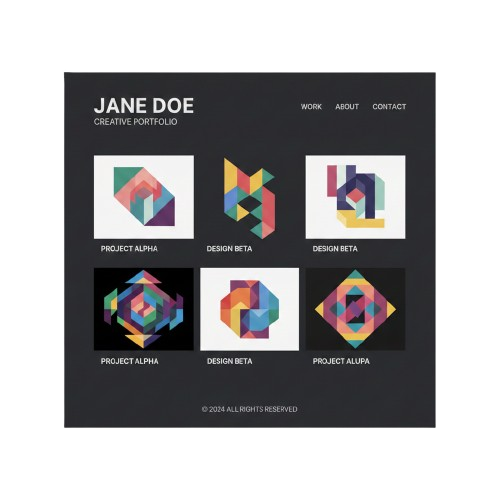
A portfolio website showcases personal work, skills, and achievements. It is commonly used by designers, photographers, writers, and developers. Making an impression on prospective customers or employers is the aim.
6. News & Media Website
This type of website shares news, articles, and updates on current events. Content is refreshed frequently to keep readers informed. It may cover topics like politics, sports, or entertainment.


7. Social Media Website
Social media websites allow users to connect, share content, and communicate online. People can post photos, videos, and messages. These platforms focus on interaction and community building.
8. Informational Website
An informational website provides clear and useful information about a specific topic. It does not sell products but focuses on educating visitors. Examples include guides, FAQs, and knowledge-based sites.

What is a Domain?
A domain is your website’s unique digital address that people type into a browser to find you (like google.com). Instead of forcing users to remember a complex string of numbers called an IP address, a domain acts as a "nickname" for your site. It serves as your identity on the web, making it easy for customers to remember and return to your brand. Think of it like your home address; it tells people exactly where to go to find your house.
Types of Domains
1. Top-Level Domains (TLD)
The TLD is the last part of the domain name (everything after the final "dot"). It indicates the nature or the location of the website.
Generic TLDs (gTLD): These are the most common.
.com: Originally for commercial businesses, now the universal standard.
.org: Generally used by non-profits.
.net: Originally for network infrastructures.
Country Code TLDs (ccTLD): These are reserved for specific countries or territories.
.uk (United Kingdom), .ca (Canada), .in (India).
Using these can help with local SEO if you are targeting a specific region.
Sponsored TLDs (sTLD): These are restricted to specific entities.
.edu: For educational institutions.
.gov: For government agencies.
.mil: For the military.
2. Second-Level Domains (SLD)
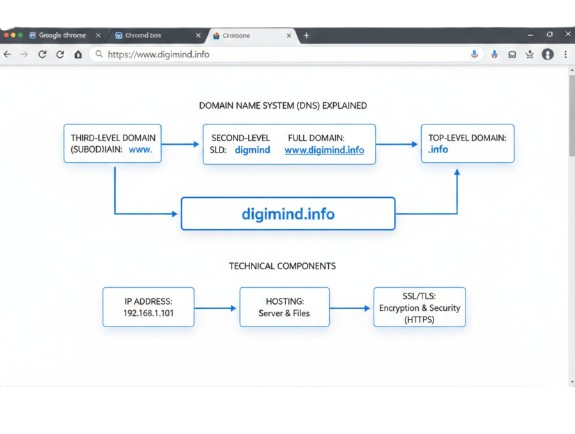
The SLD is the "meat" of your website address. It’s the unique name you choose for your brand that sits to the left of the TLD. In google.com - google is the SLD. In wikipedia.org - wikipedia is the SLD. This is the part you usually have to "buy" or register through a domain registrar. It is the identity of your site.
3. Third-Level Domains (Subdomains)
Subdomains are used to categorize and navigate to different sections of your website. They appear to the left of the SLD. Common usage: blog.yourwebsite.com or shop.yourwebsite.com. Purpose: They allow you to host content that is distinct from your main site without needing to buy a whole new domain name.
4. Fully Qualified Domain Name (FQDN)
An FQDN is the complete, absolute address for a computer or host on the internet. It includes the hostname, the SLD, and the TLD.
Example: www.example.com - www is the hostname, example is the SLD, .com is the TLD.
What is Web Hosting?
Web hosting is a service that provides the physical space on a server to store your website’s files, images, and code. While the domain is your address, hosting is the actual "house" or plot of land where your website lives so it can be seen 24/7. When someone types your domain into a browser, the hosting server delivers your content to their screen. Without hosting, your website files would just stay on your computer and never be accessible to the public.
Types of Web Hosting
1. Shared Hosting:
This is the most budget-friendly option where your website shares a single server and its resources (like RAM and CPU) with hundreds of other sites. It is perfect for beginners or small blogs with low traffic because the costs are split among many users. However, if another site on the same server gets a huge traffic spike, your site might slow down.
2. Virtual Private Server (VPS) Hosting:
A VPS acts as a middle ground; you still share a physical server, but it is "partitioned" into private virtual compartments. You get a set amount of dedicated resources that are yours alone, meaning other websites' traffic won't affect your performance. It offers more control and better security than shared hosting, making it ideal for growing businesses.
3. Dedicated Hosting:
This is the "mansion" of hosting where you rent an entire physical server exclusively for your website. You have full control over the hardware, security, and software, ensuring maximum speed and reliability for very high-traffic sites. It is the most expensive option and usually requires technical skills to manage the server effectively.
4.Cloud Hosting:
Instead of using one physical server, cloud hosting spreads your data across a network of interconnected servers. If one server fails, another takes over instantly, which means your website almost never goes down. It is highly scalable, allowing you to pay only for the resources you use and easily handle sudden bursts of visitors.

Content Management System (CMS)
In the early days of the internet, if you wanted to change a single sentence on your website, you had to open a complex file of code (HTML), find the right line, change it, and re-upload it to a server. A CMS removes that technical barrier, allowing anyone to manage a website as easily as they would write an email or a Word document.
How a CMS Works (The "Iceberg" Analogy)
To understand a CMS, imagine an iceberg:
•The Tip (The Front-end): This is what your visitors see. It’s the beautiful layout, the images, and the text.
•The Base (The Back-end): This is the CMS interface where you log in. You type your blog post, hit "Publish," and the CMS automatically handles the "translation" into code so the rest of the world can see it.
The Two Main Components-
•CMA (Content Management Application): This is the user-friendly interface. It’s the part where you click buttons, upload photos, and type text.
•CDA (Content Delivery Application): This is the "invisible worker" in the background. It takes the content you just typed into the CMA, compiles the necessary code, and updates the website for your viewers.
Why Do People Use a CMS?
1. No Coding Required
You don’t need to know $HTML$, $CSS$, or $JavaScript$. If you can use Google Docs, you can use a CMS. It democratizes the web, allowing small business owners, hobbyists, and writers to have a professional online presence.
2. Multi-User Collaboration
In a CMS, you can have different levels of access. For example: The Writer can draft a post but can't publish it. The Editor can review and change the post. The Admin can change the entire look of the site.
3. Consistency and Speed
Because a CMS uses Templates, you don’t have to design every page from scratch.6 You choose a layout once, and every time you add a new article, it automatically follows that design. This keeps your brand looking professional and saves hours of work.
Popular Examples of CMS Platforms
CMS Name Best Used For...
•WordPress -
Everything from simple blogs to massive news sites (The most popular).
•Shopify-
People who specifically want to sell products online (E-commerce).
•Squarespace-
Creatives and photographers who want a stunning, "drag-and-drop" look.
•Wix-
Beginners who want total visual control without worrying about technical settings.
•Magento-
Large corporations with complex online stores and high traffic.
Is a CMS right for you?
If you plan on updating your website more than once a year, the answer is yes. While "static" (hand-coded) websites are slightly faster and more secure, they are incredibly difficult to update. With a CMS, you may expand your website as your ideas develop.

1. The Market Titans (General Purpose)
These platforms serve the broadest audience, from personal blogs to massive news outlets.
•WordPress (.org):
The undisputed king of the web, functioning as a massive "LEGO set" for the internet. Its strength lies in an unparalleled ecosystem of over 60,000 plugins that allow a simple blog to transform into a social network or a complex directory with a few clicks.
•Joomla:
Positioned as the middle ground between simplicity and power, Joomla excels at managing complex user hierarchies and multilingual content right out of the box. It is the go-to for community-driven portals and membership sites that require advanced permission settings without custom coding.
•Drupal:
Built for high-performance and enterprise-level security, Drupal is less of a "website builder" and more of a "web framework." It is favoured by governments and global corporations because it treats content as modular data, allowing for extreme customization and heavy traffic handling.

2. The Visual & Creative Specialists
These are "all-in-one" hosted solutions where design aesthetics and ease of use are the priority.
•Wix:
A pioneer in "What You See Is What You Get" (WYSIWYG) editing, Wix uses an absolute positioning canvas that lets you drag elements anywhere. It has recently integrated advanced AI (Wix Studio) to automate site generation, making it the fastest path from an idea to a live, polished website.
•Squarespace:
Often described as the "Apple of CMS," it prioritizes high-end, curated design templates that look professional with minimal effort. It is the premier choice for photographers, artists, and boutique brands who need a sleek, portfolio-centric presence with zero technical maintenance.
•Webflow:
Bridging the gap between design and development, Webflow allows users to build "pixel-perfect" websites visually while it writes clean, semantic code in the background. It is uniquely powerful for designers who want total control over CSS and animations without needing to hire a developer.

3. E-Commerce Powerhouses
These platforms are built specifically to handle catalogs, payments, and logistics.
•Shopify:
The gold standard for retail, Shopify removes the "tech" from selling by handling everything from hosting to secure checkout on its own servers. It focuses on conversion and speed, making it the top choice for brands that want to scale a store to millions in revenue without managing a database.
•Magento (Adobe Commerce):
A high-octane engine for massive retail operations that need total control over their shopping experience. It offers unlimited scalability and a "headless" architecture, allowing huge brands to sync their inventory across mobile apps, kiosks, and websites simultaneously.

4. Modern "Headless" & Professional CMS
These systems separate the "body" (the website) from the "head" (the content), delivering data via API.
•Ghost:
Stripping away the bloat of traditional CMS, Ghost is a streamlined engine dedicated purely to professional publishing and newsletters. It uses a clean Markdown editor and has built-in subscription tools, making it the favorite for independent journalists and modern media companies.
•Strapi:
As a leading open-source "headless" CMS, Strapi allows developers to define their own content structures and deliver them to any device (smartwatches, apps, or sites). It provides a customizable admin panel while giving developers total freedom over which frontend technology (like React or Vue) they use.
•Contentful:
An enterprise-grade "Content Infrastructure" that treats content as small pieces of reusable data rather than pages. It is designed for global brands that need to push consistent product info or articles across multiple platforms and regions from a single central hub.


A wireframe is a simple visual plan of a website or mobile app. It shows where things will be placed on a page, such as the logo, menu, images, buttons, and text—without using colours, designs, or detailed graphics. Think of it as the skeleton or rough sketch of a digital page.
Explanation in Simple Words
A wireframe helps designers and developers understand how a page will look and work before it is actually designed. It focuses only on structure and layout, not on beauty or styling. Most wireframes are made using boxes, lines, and labels to represent different sections of a page.
For example, instead of showing a real image, a wireframe uses a blank box with the word “Image.” Instead of styled text, it shows plain lines to represent content. This makes it easier to plan the page without getting distracted by colours or fonts.